Blog & Insights

Expert perspectives on web development, mobile apps, SaaS, and business technology from the Wealth Profusion team

How AI Is Reshaping SaaS Products in 2026: From Smart Features to Predictive Insights

How AI Is Reshaping SaaS Products in 2026: From Smart Features to Predictive Insights

Artificial intelligence is no longer a novelty bolted onto software — it has become a baseline expectation for modern SaaS platforms. Here is how we are helping clients integrate AI features that deliver real business value, not just buzzwords.

Every SaaS buyer evaluation in 2026 includes some version of the question: "What does this platform do with AI?" Five years ago that question barely existed. Today, platforms without a credible AI story are at a real competitive disadvantage — not because AI is fashionable, but because it genuinely changes what software can do for the businesses that use it.

From Static Dashboards to Predictive Insights

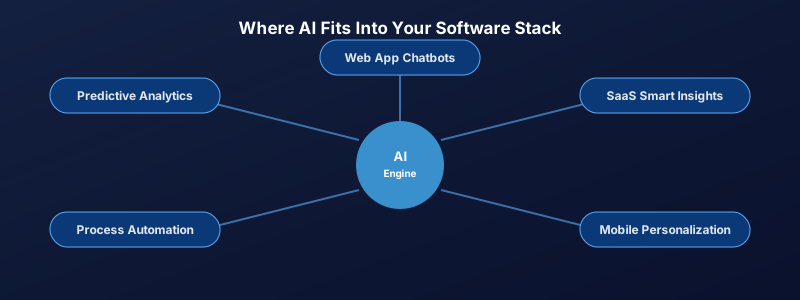
The most immediate shift we see in client SaaS projects is the move from reporting what already happened to forecasting what is likely to happen next. A subscription analytics dashboard that simply shows last month's churn is useful. One that flags which specific accounts are at elevated churn risk this week — based on usage patterns, support ticket sentiment, and login frequency — changes how a customer success team actually spends its time.

Smart Defaults and Personalization

AI also quietly improves the experience of using software, not just the insights it produces. Smart form-fill suggestions, personalized onboarding flows that adapt based on a user's role, and automatically prioritized task lists are all becoming standard expectations rather than premium add-ons. When we scope SaaS Development projects today, we build these capabilities into the architecture from day one rather than retrofitting them later.

Where AI Genuinely Helps — and Where It Does Not

Not every feature benefits from an AI layer, and over-engineering a simple workflow with a model it does not need is a common and expensive mistake. AI earns its place when there is a pattern in historical data worth learning from, when manual review does not scale, or when personalization meaningfully improves outcomes. For straightforward rule-based logic, traditional code is still faster, cheaper, and more predictable — and we tell clients exactly that during scoping rather than selling AI for its own sake.

Getting Started Without Overcommitting

The SaaS products seeing the best results did not attempt a full AI overhaul on day one. They picked one well-defined capability — a recommendation engine, a churn predictor, a smart search — proved it delivered value, and expanded from there. That same incremental approach applies whether you are building a new SaaS platform from scratch or adding intelligence to an existing one.
Log in to rate this article

What Makes a 5-Star App: The User Experience Principles Behind Top-Rated Mobile Apps

What Makes a 5-Star App: The User Experience Principles Behind Top-Rated Mobile Apps

The difference between a 3-star and a 5-star app is rarely features. It is the quality of the experience. Here are the UX principles that consistently separate top-rated apps from average ones.

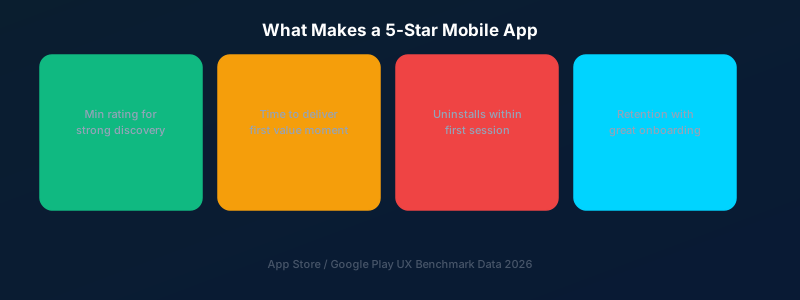
The App Store and Google Play are brutally competitive. The average app rating that drives strong organic discovery is 4.4 stars or above. The difference between a 3-star app and a 5-star app is almost never about features — it is about how the app feels to use. Here are the UX principles that separate top-rated apps from average ones.

Speed Perceived Is Speed Achieved

Users do not have accurate internal clocks — they respond to the perception of speed. Loading skeletons, optimistic UI updates, and smooth transitions make apps feel faster even when the underlying operations take the same amount of time. An app that shows a skeleton screen while loading feels faster than one that shows a blank screen followed by a sudden content pop-in.

Every Gesture Should Feel Natural

Great mobile apps are built around the idioms of their platform. On iOS, this means swipe-to-go-back, bottom sheets, and contextual menus. On Android, it means predictable back navigation and Material Design motion principles. Apps that fight platform conventions force users to think — and users who have to think give lower ratings.

Onboarding Must Deliver Value in Under 60 Seconds

The majority of app uninstalls happen within the first session. If a new user cannot understand what your app does and experience at least one moment of value within the first 60 seconds, most of them will not come back. Progressive onboarding — teaching features at the moment they are relevant rather than upfront — consistently outperforms tutorial-heavy first-run experiences.

Log in to rate this article

On-Device AI for Mobile Apps: Faster, More Private, and Finally Practical

On-Device AI for Mobile Apps: Faster, More Private, and Finally Practical

Running AI models directly on a user's phone — rather than sending every request to a cloud server — is reshaping what mobile apps can do. Here is what on-device AI actually means for the apps we build and the businesses that rely on them.

For most of the last decade, "AI in a mobile app" meant sending data to a cloud server, waiting for a response, and hoping the connection held up. On-device AI — where the model runs directly on the user's phone using frameworks like Apple's Core ML or Google's ML Kit — has matured enough that this is no longer the only option, and for many use cases, it is the better one.

Why Run AI on the Device at All

Three reasons keep coming up in client conversations: speed, privacy, and reliability offline. A model running locally responds in milliseconds instead of waiting on a network round trip, which matters enormously for features like live camera filters, real-time translation, or on-the-fly text suggestions. It also means sensitive data — a photo, a voice recording, a health metric — never has to leave the device to be processed, which is a meaningful selling point for healthcare, finance, and any consumer app handling personal information.

What This Looks Like in Practice

In recent App Development projects, on-device AI has shown up in surprisingly practical ways: a retail app that recognizes products from a photo without needing connectivity, a logistics app that flags damaged packages from a quick camera scan, and a wellness app that analyzes voice tone locally rather than uploading audio anywhere. None of these require an internet connection to function, which also means they keep working in the warehouse basements and rural delivery routes where connectivity is unreliable.

The Tradeoffs Worth Knowing

On-device models are necessarily smaller and less powerful than the large models running in the cloud, so they are best suited to focused, well-defined tasks rather than open-ended reasoning. They also increase app size and require careful testing across the wide range of phone hardware in active use. The right architecture for most apps is a hybrid one — fast, private, on-device processing for the common case, with an optional cloud fallback for anything that needs heavier computation.

Is This Right for Your App?

If your app already does any kind of real-time image, audio, or text analysis, on-device AI is worth evaluating in your next development cycle. We walk through this tradeoff with clients during the planning phase of every App Development engagement where AI features are on the table.

Log in to rate this article

API-First Design: Why Your SaaS Platform Needs an API Strategy From Day One

API-First Design: Why Your SaaS Platform Needs an API Strategy From Day One

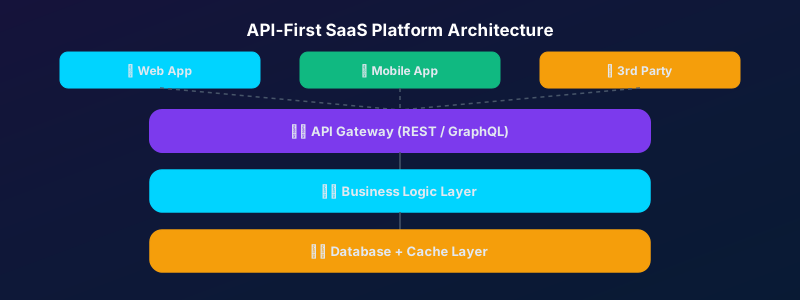
APIs are not just a technical feature — they are a growth channel. Building with an API-first approach from the start opens your platform to integrations, partnerships, and a developer ecosystem.

The most successful SaaS platforms are not islands — they are hubs. Salesforce, Stripe, Twilio, and Zapier built dominant market positions in part because they designed excellent APIs that allowed thousands of other products to build on top of them. Your SaaS may not become the next Stripe, but an API strategy is still one of the highest-leverage investments you can make.

What API-First Means

API-first design means that the API contract — the endpoints, data models, and authentication approach — is designed before the application UI. The frontend and any third-party integrations consume the same API. This approach enforces a clean separation of concerns, makes the API a first-class product, and prevents the common problem of APIs that are afterthoughts bolted onto an application not designed to support them.

The Integration Economy

In 2026, enterprise buyers evaluate SaaS products largely on integration capability. Does it connect to Salesforce? Does it have a Zapier integration? Can we connect it to our data warehouse? Platforms with strong APIs and native integrations have significantly higher win rates in enterprise sales cycles than comparable products that operate in isolation.

Log in to rate this article

Headless CMS vs Traditional CMS: Which Is Right for Your Project?

Headless CMS vs Traditional CMS: Which Is Right for Your Project?

The CMS landscape has split into two fundamentally different approaches. Understanding the tradeoffs will help you choose the right architecture for your content and team.

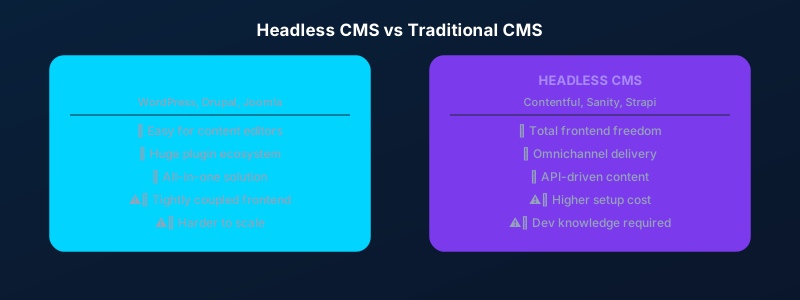
For most of the web's history, content management systems were monolithic: they handled both the content storage and the frontend rendering. WordPress, Joomla, and Drupal follow this pattern. In recent years, headless CMS platforms — where the backend content repository is decoupled from the frontend presentation layer — have grown rapidly. Here is how to choose between them.

Traditional CMS: The Case For

WordPress powers over 40% of the web for good reason. It is mature, has an enormous plugin ecosystem, and is well understood by developers, designers, and non-technical content editors alike. For straightforward websites where content editors need to manage pages easily without developer involvement, WordPress remains an excellent choice.

Headless CMS: The Case For

A headless CMS — platforms like Contentful, Sanity, or Strapi — stores content as structured data and exposes it via API, which your frontend (built in React, Next.js, or any framework) consumes. This gives you total frontend freedom, better performance through static generation, and the ability to deliver the same content to a website, a mobile app, and any other channel simultaneously.

Log in to rate this article
Back
1 2 3 4
Next

Showing posts 1–5 of 18